


There are several powerful tools for penetration into any Remote PC. The best solution for this is:Metasploit framework + Backtrack 5 OS. Do wait for my next post on this topic. In the mean while let me give you an efficient alternative for such penetration with the extremities of a Local

Area Network(LAN).
Generally for getting secret information such as passwords. we go by Phishing method. Here, we create a fake login page and redirect the password entered by the user to a pre-defined database.But, as per recent advances, receptions of complaints and public awareness; people have grown consensus regarding fake login pages. It can be clearly known by the address of the webpage which is not anyhow the same as www.facebook.com.
Lets learn a powerful penetration method : Man In The Middle attack.
I will discuss all the types of penetrations using this method and also their prevention steps.
Theme :
A basic network terminology HTTP(Hypertext Transfer Protocol) generally sends all the necessary information through plain text. In this scenario, if we make the victim use HTTP instead of HTTPS for getting connected to sites like Gmail, Facebook, Paypal etc., it will be much easier to successfully attack the victim computer by MITM attack( bucket-brigade attack),also called as Janus attack. To make the penetration operation to perfection, we will use a tool called SSL strip.
Required Applications:
i. SSL Strip >>LINK>>
ii. Ettercap >>LINK>>
iii. Python programming language latest version >>LINK>>
iv. The python “twisted-web” module >>LINK>>
(3 and 4 are required for SSL strip) For more info on installation of SSL strip, VISIT HERE
Procedure:
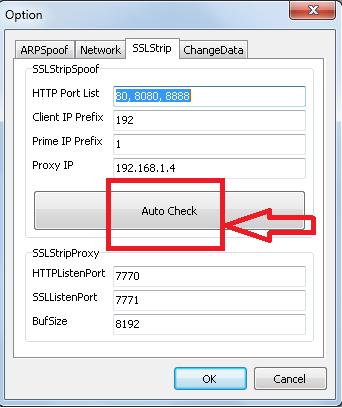
1. Open SSL strip application and fill in all the required information for desired fields such as arpsoof, network ,ssl strip, change data .If you are not aware of these, simply click auto check . Do remember to switch from HTTPS to HTTP to get included in Change data.
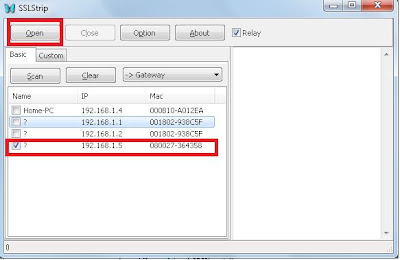
2. Then, in the listed ip addresses, check the ip address of the victim.
3. After the completion of this step. open the Ettercap application and go to sniff>unsniffed sniffing and select your network interface.

4. Then select hosts-scan hosts from the menu .Once scanning is completed, it is all set to start the hacking.
Open host list from hosts tab . Then just select the IP address of the router as target 1 and the victims IP as target 2.

5. Then select the MITM -arp positioning without selecting any additional options.
 6. Finally, go to start>start sniffing .Now when the victim logs into gmail or facebook or paypal etc., he will be using HTTP not HTTPS . Hence it is now easier for us to get the User id ,passwords of the victim what he is using to log into the desired accounts. Just check the processing window out there and check log for the below combination.
example: Data(wwwfacebook.com):keyid=1021458674&bankCode=U&FirstnameLogin=No&userName=hackdigital&password=hackdigital
Solution:
To keep yourself away from such penetration attacks,do follow secure procedures.
* Always use HTTPS instead of HTTP.
* Use two step verification login procedure for Gmail.
* Always check the addressbar before going into the webpage.
* Always check the SSL certificate before doing an online transaction.
* Keep your antivirus updated. I recommend the use of ESET Smart security for a better digital coverage.
Do post your comments if you like this article.


