Showing posts with label Internet. Show all posts

Sunday, 13 January 2013

Get a free domain name and Web hosting for one year


It's the rare new business that wouldn't benefit from a home on the Web. Quite the opposite: If someone goes looking for a business like yours and doesn't find at least a simple Web site for it, well, that's a customer who's going to a competitor.
You might think that setting up shop online costs an arm and a leg, but it's actually one of the most affordable aspects of running a business. In fact, sometimes it doesn't even cost a dime.
For a limited time, Google is offering a customized domain name and one year of Web hosting absolutely free. (Don't let the "Michigan" in the accompanying screenshot throw you; the offer is also available in other states.)
In other words, here's a soup-to-nuts solution for getting your business online, one with a price that's impossible to beat.
In addition to a customized domain name (along the lines of "widgetmasters.com," depending on what's available) and a hosted Web site for one full year, you get a complete Web site courtesy of Intuit's site-building service.
Google Get Your Business Online
That gives you a choice of hundreds of templates, customization options to make the site more accurately reflect your business, analytics tools, and so on.
The especially good news for newbies is that it's all pretty drag-and-drop simple; you don't need any HTML coding experience or the like to build a decent-looking and functional site.
The only real downside here is support: You get 30 days of online chat support free of charge, and after that you're stuck with online forums and the like. (You can pay extra for live support, natch.)
Once your free year is up, you'll pay $6.99 monthly to keep the site and domain -- very reasonable rates by any account.
There are plenty of other inexpensive site-building and -hosting options out there, but if you want to get your business online quickly, easily, and as cheaply as humanly possibly, this is definitely a deal worth investigating.

Friday, 8 June 2012

Firefox Facebook Shortcuts

Here are some shortcuts for using Facebook in Firefox Browser:

Shift+Alt+1: View your News Feed
Shift+Alt+2: View your own Profile
Shift+Alt+3: View pop-up of friend requests
Shift+Alt+4: View pop-up of messages
Shift+Alt+5: View pop-up of notifications
Shift+Alt+6: View Account Settings
Shift+Alt+7: View Privacy Settings
Shift+Alt+8: View Facebook’s own profile
Shift+Alt+9: Read latest Terms of Service agreement.
Shift+Alt+0: Open Facebook Help Center
Shift+Alt+?: Search
Shift+Alt+m: Compose a new message

Top Funny Google Tricks

We all use google for searching but its
time to explore the funny side of
google.Here I have collected the top
funny google tricks that will amaze
you.Some of the tricks are provided by
google itself while other have been developers.
1. Google gravity:-
We all have read
the Newton’s law of gravity.Does it
also apply to google?
To test it follow the instructions...
Go to google.com Type Google Gravity
Click on I’m feeling Lucky
Now you will see the effect of gravity
on google.The google icon will fall
down automatically.You can even
pickup and throw google icon anyware

2. Change Background Image:-
You
can also change the background
image of google image.To change the
background image follow the
instructions
Go to google.com Click on the Change Background
Image
Login with gmail username and
upload Image
[This will not work if you open the
encrypted google.]
3-Epic Google:-
In epic google you will
see the font size of google increasing
automatically as if it will come out of
your computer screen.To use google
Follow the instructions
Go to google.com Type Epic Google
Click on I’m feeling Lucky.

4. Google Hacker:-
want to see how the
google homepage will look if it gets
hacked .Follow the instructions below
Go to google.com
Type Google Hacker
Click on I’m feeling Lucky

5. Annoying Google:-
In this trick the
capitalisation of your searches will
change automatically.Some words will
change into small letter and some into
capital letters in your search
result.Want to try it follow the instructions
Go to google.com
Type Annoying Google
Click on I’m feeling Lucky.

Monday, 4 June 2012

Get 5GB Online Storage from Google Drive


Hi Friends,
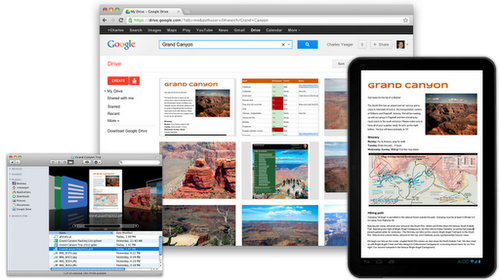
Watch out Dropbox, Amazon Cloud and Microsoft SkyDrive! Google introduced today its free, 5GB cloud storage service, Google Drive. Available to anyone with the Google account, Google Drive enables users to upload, share, collaborate on files stored in their Google Drive account.
If you’re familiar with Dropbox, you’ll be right at home with Google Drive. In addition to accessing the service from within your Google Docs account, you can also download the PC and Mac Google Drive client that launches as a folder on your computer. All files, including videos, photos, PDFs, and Google Docs, dropped into the Drive folder get synchronized to your account. You can also opt to not sync selected folders to one or more of your computers.


Watch out Dropbox, Amazon Cloud and Microsoft SkyDrive! Google introduced today its free, 5GB cloud storage service, Google Drive. Available to anyone with the Google account, Google Drive enables users to upload, share, collaborate on files stored in their Google Drive account.
If you’re familiar with Dropbox, you’ll be right at home with Google Drive. In addition to accessing the service from within your Google Docs account, you can also download the PC and Mac Google Drive client that launches as a folder on your computer. All files, including videos, photos, PDFs, and Google Docs, dropped into the Drive folder get synchronized to your account. You can also opt to not sync selected folders to one or more of your computers.

Sunday, 3 June 2012

Creating Apache/PHP/MySQL Server (Host your own files)


Introduction: -- What are we creating extactly?
- A webserver in which you can host your own files
- Integrated with PHP
- Also, MySQL capabilities
- A new domain for your webserver

DISCLAIMER: By the end of this tutorial, your webserver is only online as long as your computer is!

Have I lost you yet? In that case you might as well go here and start learning.
Basically we are creating our own website...

Step #1:
Download XAMPP
What is XAMPP? It is a package with an autoinstall of PHP, MySQL, and Apache.

[
download link - 

h tt p:/ /ww w. apachefriends .o rg/download .p hp? xampplit e-w in3 2- 1.7.3.e xe

remove spaces. 
]
MD5 checksum: ce02838d8e92407926429e3829d113a5
**This is a safe file, however I cannot check this with novirusthanks.org, it is 28MB and the limit is 20MB, sorry.

----------------------------------------------------------------------------------------

Step #2:
a) Run xampplite-win32-1.7.3
b) Choose a destination folder (I chose C:/ for ease of use)
c) Allow it to extract all of its files.


Step #3: A command prompt should pop up after the install is complete.

# Question: Should I add shortcuts to the startmenu/desktop? (y/n):
a) Hit , make sure y is selected.
# Question: Should I proceed? (y/x=exit setup):
b) Hit , Make sure y is selected.
# Question: Should I make a portable XAMPP without drive letters?
c) Hit , make sure n is selected
# Press to continue:
d) Hit
# Press to continue:
e) Hit again
# Please choose (1-5/x)
f) Hit 1, then


Step #4: Customizing your webserver!

You may close the Command Prompt.
Also, the XAMPP Control Panel should have popped up.


a) Hit the "Start" across from Apache
b) Hit the "Start" across from MySql

Congratulations! You have now created a web-server, however it is currently local. (Not on the internet yet)

Now to customize--
a) Go to the directory you chose to install in.
(For me, this is C:\xampplite)
b) Find the "htdocs" folder, open it
**This is your website directory, this is where you would store files like viruses or your index.html**
c) delete index.php and index.HTML and the xampp folder, put in any files you wanted hosted into htdocs

d) Test the web server... Open a browser type http://127.0.0.1 or http://YOUR-INTERNAL-IP (Mine is http://192.168.1.108)
your files should show up :) However they are not on the internet yet.

Your files in the C:\xampplite\htdocs directory should show up on the page
-----------------------------------------------------------------------------------------
Step #6: Giving your website a new domain (OPTIONAL)

a) **click** Sign up and change your domain to h tt p: // anything .c o.n r **click**
b) **click** Sign up and change your domain to ht t p:/ /a nythin g.t k **click**
If I wanted to change my domain from http://50.158.259.12 to http://whteveryourdomainis.tk:
a) click the link provided above
b) type my current address (ht tp :/ /5 2.13 8.2 59. 1 2) hit next
c) "The web address will be renamed to.." Write: whateveryourdomainis.tk
d) hit the confirm button under the check.
Your new domain as http://whteverurdomainis.tk should now go back to your external ip address.

Friday, 1 June 2012

Methods to how to enjoy free INTERNET DOWNLOAD MANAGER


how to hack or crack Internet Download Manager (IDM) manually. IDM is the best Internet download manager available on internet but its not free and its cracked or patched versions contains viruses. Using this hack you can register the Internet Download Manager (IDM) for free using you own credentials i.e register on your Name and email ID. I am explaining the manual hacking method because most of the patch and keygen contain viruses.
Now suppose you have updated your IDM (Internet Download Manager) and if you are using cracked or patched version, after updating IDM, it shows an error message that you have registered IDM using fake serial key. And after that IDM exits and hence it doesn't download anything.
This hack also works for trail IDM that means download a trail IDM from there site and register the professional i.e. full version of IDM with your credentials for free using my hack.

Step 1: Download the IDM trial or If you already have IDM installed Update it by going to Help---}} then to check for Updates.
 If you don't wanna update your version, Just click on Registration.
Step2: When you click on registration, Now a new dialog appears that is asking for Name, Last Name, Email Address and Serial Key.
Step3: Now Enter you name, last name, email address and in field of Serial Key enter any of the following Keys:

RLDGN-OV9WU-5W589-6VZH1
HUDWE-UO689-6D27B-YM28M
UK3DV-E0MNW-MLQYX-GENA1
398ND-QNAGY-CMMZU-ZPI39
GZLJY-X50S3-0S20D-NFRF9
W3J5U-8U66N-D0B9M-54SLM
EC0Q6-QN7UH-5S3JB-YZMEK
UVQW0-X54FE-QW35Q-SNZF5
FJJTJ-J0FLF-QCVBK-A287M

Step4: Now after you click ok, it will show an error message that you have registered IDM using fake serial key and IDM will exit. Now here the hack starts.

Step5: Now Go to START --}} Then go to RUN  and type the following text and click enter:

notepad %windir%\system32\drivers\etc\hosts

Now copy the below lines of code and add to hosts file as shown above:

127.0.0.1    tonec.com
127.0.0.1    www.tonec.com
127.0.0.1    registeridm.com
127.0.0.1    www.registeridm.com
127.0.0.1    secure.registeridm.com
127.0.0.1    internetdownloadmanager.com
127.0.0.1    www.internetdownloadmanager.com
127.0.0.1    secure.internetdownloadmanager.com
127.0.0.1    mirror.internetdownloadmanager.com
127.0.0.1    mirror2.internetdownloadmanager.com

After adding these piece of code, save the notepad file. And exit from there.
Now start your Internet download manager, and now you IDM has been converted to full version and specially when you update next time, your registration will not expire. That means it will remain full version for life time and you can update it without any problem.

Download 1500+ Proxy Server's List | All tested and Working Free Proxy Servers

Download 1500+ Proxy Server's List | All tested and Working Free Proxy ServersI recently made this whole list of proxy servers which i gathered from various
websites just for you guys.As a hacker it is a must to keep your identity hidden,for doing so you need a very quick and smart tool called a proxy.


What is a Proxy Server ?

A proxy server which makes you view your desired webpages but not through your originalIP.In short it just protects your IP from being revealed by the website for that matter.For ex. If my IP is "76.74.255.236",what that server does is that it loads the webpage through another IP say, "89.16.178.168" and keeps your IP being tracked/tapped.

List of Proxy Servers:

Here is a small list of proxy servers :
http://proxyhost.org
http://webproxy.dk
http://phproxy.frac.dk
http://phproxy.1go.dk
http://proxify.com
http://home.no.net/roughnex
http://nomorefilter.com
http://rapidwire.net
http://oproxy.info
http://stealth-ip.net
http://cooltunnell.com
http://schoolsurf.com
http://anonymouse.org
http://goodproxy.com
http://nomorefilter.com
http://openweblive.com


For the whole list you can just download it from here :

File Details:
Download: 1500+ Proxy List
Password: hackmeout.blogspot.com
File Size: 9 KB
File Extension: .rar (Compressed Archive)

Thursday, 31 May 2012

Tips to Speed up YouTube Buffering.


Speed up Youtube Videos Buffering 3 Times Faster.............................
We all love YouTube as it gives us the power to learn, listen our favorite music and some times pass time by watching funny videos. YouTube is the world’s no.1 online videos sharing website with over million new videos uploaded daily. This number tell us that how much influence YouTube has over internet users and if someone cannot have access or very limited access due to the slow internet connection than its very disappointed. But there are certain ways through which you can really improve the buffering speed of YouTube videos so that you can enjoy watching videos on slow connections too. Infect by doing these windows tricks i was able to improve my videos buffering speed up-to 3 times faster.
Tips to Speed up YouTube Buffering.
1. Speed up your Internet connection.Not many people know that they increase the internet connection speed up-to 20% which will definitely increase the loading of YouTube videos. You may be wondering how this is possible. The answer is very simple, Microsoft windows kept or steals 20% bandwidth of your internet connection to there activities like Update, Sending error reports etc. So if we change some registry values in our windows than we can bring back this speed so that we enjoy 100% of our internet speed.Click on start button ans than select RUN. Type “gpedit.msc” in Run box.Select Local Computer Policy >> Computer Configuration >> Administrative Templates >> Network >>Qos Packet Scheduler >> Limit Reservable Bandwidth.Double click on limit Reservable Bandwidth and then select enable and edit the bandwidth to Zero.You will not find “gpedit.msc” in Windows 7 Starter and Basic by default so you have to first download the installer from here. Install it and now you will be able to find this in windows.
2. Enable YouTube Feather.Some time ago YouTube launched YouTube Feather beta for its users with low internet bandwidth so that they can enjoy faster page loading speeds. For this to activate you have to first login into your YouTube account and than visit YouTube Feather Beta page. Click on Join the Feather beta link at the bottom of the page and start searching videos. You will see a clear difference in page loading.But Feather Beta has also some limitations like you cannot see or post comments. You cannot like or Dislike the video which means that you can only watch the video. Also YouTube will only suggest you 5 videos related to the one you are watching.
3. Use YouTube DNS.By default our computer’s network card settings are set to Obtain DNS Server Address Automatically which in many cases is good but when it comes to YouTube buffering its better to use YouTube DNS in order to speed up your buffering. Open your Network card DNS settings page via Networking menu in Control Panel and set these values.208.67.222.222208.67.220.220
4. Install SpeedBit Video Accelerator.Unfortunately only doing above mention steps or not enough if you want ground braking results. Install SpeedBit Video Accelerator which is a free software. Install it and after that it will automatically do its magic and you can enjoy watching HD videos with out any delays. Not only is increases the buffering speed but you can also save videos from more than 115 videos haring websites with just 1 click of a button.

Watch Free TV On Your PC Using VLC Player


Watch Live TV on Your PC For Free
Now you can watch free Tv on your pc by just using a VLC player.
...
Step 1 : First of all you need to have VLC player, if you don’t have vlc player kindly download and install it
... Step 2 : Now open Vlc Player, and select streaming option from the media menu present in the menu bar.
Step 3 : Select network option and enter the url of the streaming
channel. For example if you want to view B4u Music you need to add url
rtsp://217.146.95.166:554/ playlist/ch12zqcif.3gp
in the url field and then select play option from the stream drop down menu.
Step 4 : After you click play in the above step, the channel will start streaming and you can watch your favorite channels.
Here is the List of many other channels which you will love to watch
Channel Name
Link
NDTV rtsp://ss1c6.idc.mundu.tv:554/
prf0/cid_33.sdp
NDTV Profit rtsp://ss1c6.idc.mundu.tv:554/
prf0/cid_31.sdp
Times Now rtsp://ss1c6.idc.mundu.tv:554/
prf0/cid_2.sdp
Aaj Tak rtsp://ss1c6.idc.mundu.tv:554/
prf0/cid_4.sdp
CNBC Aawaz rtsp://ss1c6.idc.mundu.tv:554/
prf1/cid_34.sdp
CNBC TV 18 rtsp://ss1c6.idc.mundu.tv:554/
prf0/cid_35.sdp
Headlines Today rtsp://ss1c6.idc.mundu.tv:554/
prf0/cid_7.sdp
NDTV 24×7 rtsp://ss1c6.idc.mundu.tv:554/
prf0/cid_29.sdp
NK News rtsp://94.75.250.53:554/ rtplive/rknews.sdp
RAJ News rtsp://94.75.250.220:1935/ live/rajnews2.sdp
ETV rtsp://94.75.250.53/rtplive/ etv2low.sdp
Studio N rtsp://94.75.250.220:1935/ live/studion2
SVBC rtsp://94.75.250.220/rtplive/ svbclow
Zoo Vision rtsp://stream.zoovision.com/ live.sdp
B4u Music rtsp://217.146.95.166:554/ playlist/ch12zqcif.3gp
iMusic rtsp://217.146.95.166:554/ playlist/ch26yqcif.3gp
Zee Tamil rtsp://121.244.145.226:554/ prf1/cid_54.sdp
Zee Kannad rtsp://121.244.145.226:554/ prf1/cid_55.sdp
Zee Bangla rtsp://121.244.145.226:554/ prf1/cid_52.sdp
Music Box rtsp://stream.the.sk/live/ musicbox/musicbox-3m.3gp
Bella Tv rtsp://217.146.95.166:554/ playlist/ch29yqcif.3gp
Fashion Tv rtsp://217.146.95.166:554/ playlist/ch27yqcif.3gp
Adventure rtsp://
video3.multicasttech.com/ AFTVAdventure3GPP296.sdp
Horror rtsp://
video2.multicasttech.com/ AFTVHorror3GPP296.sdp
Comedy rtsp://
video3.multicasttech.com/ AFTVComedy3GPP96.sdp
Classic rtsp://
video3.multicasttech.com/ AFTVClassics3GPP296.sdp
Crime rtsp://
video2.multicasttech.com/ AFTVCrime3GPP296.sdp
Mystery rtsp://video2.multicasttech.com/ AFTVMystery3GPP296.sdp
Clubbing Tv rtsp://217.146.95.166:554/playlist/ch21yqcif.3g

How to Know the IP address of a Person on Facebook

This technique works when you are chatting with that person. The first demand of operation is to close all of the website and Messengers that you are using, even clean History and delete Cookies as precaution. Now start chatting with that person.
The first thing you do is to open start->run->cmd.exe now in it type following command:
netstat –an
and wait and watch the foreign address will be the IP address
If u like the post do comment !!

How To Recover Your Disabled Facebook Account


In today's trend, everyone is addicted to Facebook. Sometimes users account got disable because of some violations. There may be many reasons why your Facebook account can be disable. If you think your account get disabled in mistake or you have not violate any Facebook's Statement of Rights and Responsibilities, you can request facebook for recovering your account back. Follow these steps:
You can also send request to Facebook of your disabled account by sending Email at disabled@facebook.com with accurate information including Name, Email Address, Date of birth & reason if you know.
For more information check this facebook help form: Help Center

Share

Twitter Delicious Facebook Digg Stumbleupon Favorites More