Showing posts with label 2012 new hacks. Show all posts

Saturday, 9 March 2013

Facebook Account Temporarily Locked or blocked?

Facebook Account Temporarily Locked or blocked:::....

Isn't frustrating????

Reason:

A) May be Facebook making an improvement in the database and the account get "Locked" are stored on. During this time,it may not be able to gain access to the account. It may last for an hours. If this doesn't work, try submitting Facebook form.

B) May be Facebook has detected suspicious activity and has temporarily suspended due to security precaution.


C) Randomly adding large number of friends and sending continuously message to your friend list. Due to which unknown friend has detected as a spam or reported abuse. If in a bulk large number of people report abuse or spam then it may also get locked temporarily.


D) May be randomly using different devices to open a Facebook account.
How to recover::::...
A) Don't Open your Facebook account up to 96 hrs. Then after that clear cache and everything and may it will back to normal.


B) Go through automated security verification process if it has detected some suspicious attack.


C) Email Facebook at disabled@facebook.com. It may took 2-3 days for a response. It ask about your name, date of birth and a brief description of problem. They most likely ask you to confirm your identification with a DL or passport. After that they will send a reactivation link, assuming may you haven't violated any policies.
Preventive Measure:
Friends are too valuable and means to us, so we never want to lose it and suppose one morning by waking up it came to known that Facebook account is blocked or locked, it would be very disastrous.


A) Don't use proxy servers - As we know, proxy server use anonymous ips in order to access blocked sites. By doing so,it might create negative impact on Facebook account. Actually proxies are unknown to Facebook and it may affect the security network. So, its better not to use them.


B) Don't use too many devices - Try to prevent using too many devices for your Facebook account. Previously it not the case, it allows sign in to your account from different devices. But now, security level of Facebook is increasing day by day, so preventing the use will definitely keeps you in safer side.
Based on my speculations, I think this are the common issues Facebook user are facing right now. There is no hand to hand solution from Facebook side and some process as per their concern took long time with no result. Hope this would help Facebook user and it would be updated with the time if any changes occur in future. Moreover you can find more interesting article that really differentiate the way of communication effect your relationship in Facebook.


Sunday, 13 January 2013

Get a free domain name and Web hosting for one year


It's the rare new business that wouldn't benefit from a home on the Web. Quite the opposite: If someone goes looking for a business like yours and doesn't find at least a simple Web site for it, well, that's a customer who's going to a competitor.
You might think that setting up shop online costs an arm and a leg, but it's actually one of the most affordable aspects of running a business. In fact, sometimes it doesn't even cost a dime.
For a limited time, Google is offering a customized domain name and one year of Web hosting absolutely free. (Don't let the "Michigan" in the accompanying screenshot throw you; the offer is also available in other states.)
In other words, here's a soup-to-nuts solution for getting your business online, one with a price that's impossible to beat.
In addition to a customized domain name (along the lines of "widgetmasters.com," depending on what's available) and a hosted Web site for one full year, you get a complete Web site courtesy of Intuit's site-building service.
Google Get Your Business Online
That gives you a choice of hundreds of templates, customization options to make the site more accurately reflect your business, analytics tools, and so on.
The especially good news for newbies is that it's all pretty drag-and-drop simple; you don't need any HTML coding experience or the like to build a decent-looking and functional site.
The only real downside here is support: You get 30 days of online chat support free of charge, and after that you're stuck with online forums and the like. (You can pay extra for live support, natch.)
Once your free year is up, you'll pay $6.99 monthly to keep the site and domain -- very reasonable rates by any account.
There are plenty of other inexpensive site-building and -hosting options out there, but if you want to get your business online quickly, easily, and as cheaply as humanly possibly, this is definitely a deal worth investigating.

Sunday, 30 December 2012

Windows 8 Pro Activator Final (+ Windows 8 Personalization Enabler)


Windows 8 Professional Final Activator. This is the latest New Windows 8 100% Working Activator. Try it Now and Activate Your Windows 8 Pro, Enterprise, and Core Final Edition.
This Activator Features:
Fully Unlocked: Personalization,Start screen,,Account Picture
Full Instraction:
1.Run as administrator
2.Wait for the process and dont do nothing
3.It restarts automatically
  • Windows is "activated"
  • Supported Version
  • Windows 8 Professional
  • Windows 8 Enterprise
  • Windows 8 Core
  • Windows 8 Personalization Enabler

This program will enable the personalization features in the PC Settings. 
You will be able to change the account picture,lock screen and the start screen.
IMPORTANT:
IF Windows 8 is Not Activate You must activate windows 8 first using the activator
Before running the personilazion enabler plz close all your applications since your system will automatically restarted.


[INSTALL NOTES]

1.Run as administrator
2.Wait for the process and dont do nothing
3.It restarts automatically
Windows is "activated"


Dounload Link


powered by MAS


Friday, 8 June 2012

Top Funny Google Tricks

We all use google for searching but its
time to explore the funny side of
google.Here I have collected the top
funny google tricks that will amaze
you.Some of the tricks are provided by
google itself while other have been developers.
1. Google gravity:-
We all have read
the Newton’s law of gravity.Does it
also apply to google?
To test it follow the instructions...
Go to google.com Type Google Gravity
Click on I’m feeling Lucky
Now you will see the effect of gravity
on google.The google icon will fall
down automatically.You can even
pickup and throw google icon anyware

2. Change Background Image:-
You
can also change the background
image of google image.To change the
background image follow the
instructions
Go to google.com Click on the Change Background
Image
Login with gmail username and
upload Image
[This will not work if you open the
encrypted google.]
3-Epic Google:-
In epic google you will
see the font size of google increasing
automatically as if it will come out of
your computer screen.To use google
Follow the instructions
Go to google.com Type Epic Google
Click on I’m feeling Lucky.

4. Google Hacker:-
want to see how the
google homepage will look if it gets
hacked .Follow the instructions below
Go to google.com
Type Google Hacker
Click on I’m feeling Lucky

5. Annoying Google:-
In this trick the
capitalisation of your searches will
change automatically.Some words will
change into small letter and some into
capital letters in your search
result.Want to try it follow the instructions
Go to google.com
Type Annoying Google
Click on I’m feeling Lucky.

HOW TO FIX CORRUPTED FILES IN WINDOWS XP

HOW TO FIX CORRUPTED FILES IN
WINDOWS XP
.
Step 1
Place your Windows XP CD in CD/DVD
drive, and verify that the computer
recognizes it by waiting for the
AutoLoad to appear, or opening "My
Computer" and seeing it in your CD/ DVD drive.
Step 2
Point and click your "Start" menu, and
select "Run"
A box will appear that will prompt you
for a command.
Step 3
In the box that appears, type in:
sfc /scannow
The fix will now load, and will hopefully
fix all of the corrupted files on your
Windows XP drive. If that does not fix it, you may want to
try loading a repair image, or there
could potentially be damage to your
hard drive that is not fixable on a
software level.
You could also attempt a defragment of your hard drive, as fragmentations of
files can sometimes produce errors.

Tuesday, 5 June 2012

Cool Facebook Chat Images

TRY THIS...
ITS AMAZING.. :)

Copy the codes and paste it on ur chat !!! ♥

... 1.Mask

[[255006724575192]] [[255006727908525]] [[255006737908524]] [[255006734575191]] [[255006731241858]]
[[255006827908515]] [[255006831241848]] [[255006824575182]] [[255006817908516]] [[255006821241849]]
[[255006874575177]] [[255006871241844]] [[255006884575176]] [[255006877908510]] [[255006881241843]]
[[255006934575171]] [[255006931241838]] [[255006941241837]] [[255006944575170]] [[255006937908504]]
[[255007004575164]] [[255007001241831]] [[255006994575165]] [[255006997908498]] [[255006991241832]]
[[255007084575156]] [[255007101241821]] [[255007077908490]] [[255007091241822]] [[255007081241823]]

2. Jack Sparrow

[[298356520217565]] [[298356516884232]] [[298356506884233]] [[298356510217566]]
[[298356513550899]] [[298356620217555]] [[298356606884223]] [[298356616884222]]
[[298356610217556]] [[298356613550889]] [[298356673550883]] [[298356676884216]]
[[298356666884217]] [[298356680217549]] [[298356670217550]] [[298356740217543]]
[[298356733550877]] [[298356743550876]] [[298356730217544]] [[298356736884210]]
[[298356823550868]] [[298356810217536]] [[298356820217535]] [[298356826884201]]
[[298356813550869]] [[298356906884193]] [[298356896884194]] [[298356900217527]]
[[298356903550860]] [[298356893550861]] [[298356950217522]] [[298356946884189]]

3. Superman

[[299528860107644]] [[299528863440977]] [[299528866774310]] [[299528856774311]]
[[299528870107643]] [[299528950107635]] [[299528943440969]] [[299528946774302]]
[[299528953440968]] [[299528956774301]] [[299529013440962]] [[299529016774295]]
[[299529010107629]] [[299529003440963]] [[299529006774296]] [[299529060107624]]
[[299529063440957]] [[299529066774290]] [[299529070107623]] [[299529073440956]]
[[299529173440946]] [[299529183440945]] [[299529180107612]] [[299529176774279]]
[[299529186774278]] [[299529243440939]] [[299529236774273]] [[299529240107606]]

4. Elmo

[[302117289844540]] [[302117283177874]] [[302117276511208]] [[302117279844541]] [[302117286511207]] [[302117366511199]]
[[302117369844532]] [[302117373177865]] [[302117383177864]] [[302117379844531]] [[302117426511193]] [[302117436511192]]
[[302117429844526]] [[302117423177860]] [[302117433177859]] [[302117523177850]] [[302117529844516]] [[302117526511183]]
[[302117536511182]] [[302117533177849]] [[302117606511175]] [[302117596511176]] [[302117599844509]] [[302117593177843]]
[[302117603177842]] [[302117646511171]] [[302117649844504]] [[302117659844503]] [[302117656511170]] [[302117653177837]]
[[302117706511165]] [[302117703177832]] [[302117699844499]] [[302117709844498]] [[302117696511166]] [[302117749844494]]

5. Troll face

[[242538225822042]] [[242538222488709]] [[242538232488708]] [[242538219155376]] [[242538229155375]] [[242538339155364]]
[[242538335822031]] [[242538342488697]] [[242538345822030]] [[242538349155363]] [[242538392488692]] [[242538395822025]]
[[242538399155358]] [[242538402488691]] [[242538405822024]] [[242538475822017]] [[242538472488684]] [[242538489155349]]
[[242538492488682]] [[242538485822016]] [[242538562488675]] [[242538565822008]] [[242538569155341]] [[242538575822007]]
[[242538572488674]] [[242538612488670]] [[242538625822002]] [[242538619155336]] [[242538622488669]] [[242538615822003]]
[[242538675821997]] [[242538682488663]] [[242538672488664]] [[242538679155330]] [[242538685821996]] [[242538742488657]]

6. Mr. Bean

[[255016264574238]] [[255016271240904]] [[255016277907570]]
[[255016267907571]] [[255016274574237]] [[255016384574226]]
[[255016387907559]] [[255016394574225]] [[255016401240891]]
[[255016391240892]] [[255016464574218]] [[255016454574219]]
[[255016457907552]] [[255016461240885]] [[255016451240886]]
[[255016537907544]] [[255016531240878]] [[255016534574211]]
[[255016541240877]] [[255016527907545]] [[255016634574201]]

How to open Block Site

Some possible ways to open Blocked sites :

Method 1 :
Using Web based proxies :
1) Google " Free web proxies " and you will get 1000 of free web based proxies.
ex : http://hidemyass.com/proxy/
2) Open any of them and enter the URL of the site you want and just hit open .

Method 2 :
Using Google as a proxy :
1)Go to translate.google.com .
2)Enter any website you want to open .
3)Choose any language other than english in the **From** and choose **english** in ** To ** box.
4) Click on Translate.
5)Thats it You are done.You are now using google as a proxy.

Method 3 :
Using PORT proxies :
1) Download Mozilla firefox .
2) Go to : http://hidemyass.com/proxy-list/
3) Choose any ip address having good connection time and speed .
4) Note down the ip and port .
5) Now in Mozilla firefox go to
Tools>options>advanced>netowrk>Settings [ Connection ] > Click on manual Proxy configuration .
6) Enter the Ip address and the port .
7) Also select the option "Use this Proxy server for all Protocols " .
8) Click on Ok.
9) Now you are done , Open any blocked website :D

Method 4 :
TOR -The onion Router
This includes detailed explanation and working so i will be covering this in my upcoming tutorials .

Keep visiting pakhax
Stay updated!!
Post You queries and Feedback in comments.

Like and Share !!

Monday, 4 June 2012

Get 5GB Online Storage from Google Drive


Hi Friends,
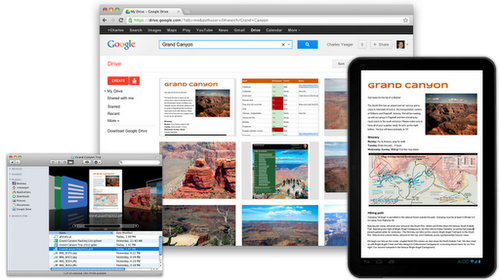
Watch out Dropbox, Amazon Cloud and Microsoft SkyDrive! Google introduced today its free, 5GB cloud storage service, Google Drive. Available to anyone with the Google account, Google Drive enables users to upload, share, collaborate on files stored in their Google Drive account.
If you’re familiar with Dropbox, you’ll be right at home with Google Drive. In addition to accessing the service from within your Google Docs account, you can also download the PC and Mac Google Drive client that launches as a folder on your computer. All files, including videos, photos, PDFs, and Google Docs, dropped into the Drive folder get synchronized to your account. You can also opt to not sync selected folders to one or more of your computers.


Watch out Dropbox, Amazon Cloud and Microsoft SkyDrive! Google introduced today its free, 5GB cloud storage service, Google Drive. Available to anyone with the Google account, Google Drive enables users to upload, share, collaborate on files stored in their Google Drive account.
If you’re familiar with Dropbox, you’ll be right at home with Google Drive. In addition to accessing the service from within your Google Docs account, you can also download the PC and Mac Google Drive client that launches as a folder on your computer. All files, including videos, photos, PDFs, and Google Docs, dropped into the Drive folder get synchronized to your account. You can also opt to not sync selected folders to one or more of your computers.

Sunday, 3 June 2012

MAC SPOOFING


Protect Personal and Individual Privacy.  Some companies track users via their MAC Addresses...  In addition, there are more and more Wi-Fi Wireless connections available these days, and Wireless network security and privacy is all about MAC Addresses...
Perform Security Vulnerability Testing, Penetration Testing on MAC Address based Authentication and Authorization Systems, i.e. Wireless Access Points. (Disclaimer: Authorization to perform these tests must be obtained from the system owner(s).)
Build "TRUE" Stand-by (offline) systems with the EXACT same CompterName, IP, and MAC ADDRESSES as the Primary Systems.  If Stand-by systems should be put online, NO arp table refresh is necessary, which eliminates extra downtime.
 Some online Game Players (Gamers) require changing the MAC addresses to fix IP problems for some reason...
Build High-Availability solutions.  For example, some firewalls that run on multi-port NIC's (i.e. quad port NIC) require the same MAC address for every port.
Troubleshoot Network problems.  Arp Tables, Routering, Switching, ...
Troubleshoot system problems
Test network management tools
Test incident response procedures on simulated network problems
Test Intrusion Detection Systems (IDS), whether they are Host and Network Based IDS.
If for whatever reason you need to keep the same MAC address as your old NIC, but your old NIC failed...
Some software can ONLY be installed and run on the systems with pre-defined MAC address in the license file.  If you need to install one of these software to another system with a different Network Interface Card (NIC) because your NIC is broken, SMAC will come handy.  However, you are responsible to comply with the software vendor's licensing agreement.
Some Cable Modem ISP's assign IP addresses base on the PC's MAC addresses.  For whatever reason, if you need to swap 2 PC's  regularly to connect to the cable modem, it would be a lot easier to change the MAC addresses rather than to change Network Interface Card (NIC).  (You need to check with your ISP and make sure you are not violating any service agreements.)
Over 1,500,000 downloads by users from major corporations and from around the world, making SMAC the most stable and popular Windows MAC Address Modifying utility.


 How is it done?

SMAC took advantage of the NdisReadNetworkAddress function in the Microsoft Device Driver Development Kit (DDK.)
NdisReadNetworkAddress(...) is called by the network adapter driver to obtain a user specified MAC address in the registry. After the driver confirms that there's a valid MAC address specified in the registry key, the driver then programs the MAC address to its hardware registers to override the burn-in MAC address.

Caution on changing MAC Addresses
 
Make sure you DO NOT assign one MAC address to multiple NIC's on a local area network (LAN).  If you do that, you will create a lot of problems.  MAKE SURE YOU HAVE ONE UNIQUE MAC ADDRESS PER NIC!!!
Make sure you DO NOT use Multicast or invalid MAC addresses.  You can check out the Multicast MAC addresses athttp://www.iana.org/assignments/ethernet-numbers.  Note:  "00-00-00-00-00-00" is not a valid MAC address.
MAKE SURE YOUR INTENTION AND PURPOSE IS LEGAL AND ETHICAL!!!

Tool for changing MAC Address  

SMAC is a Windows MAC Address Modifying tool, and is based on this research article.  SMAC is developed by KLC Consulting Security Team.  URL of SMAC is http://www.klcconsulting.net/smac. 

Getting Started

Before we get into the technical details, if you are not comfortable of changing MAC Address via registry entries, please use the User Friendly SMAC MAC Address Changer.  It will be less risk and it will make your life a lot easier. 
There could be couple ways to do change (spoof) MAC Addresses on Windows 2000, XP, 2003, and VISTA.  Make sure you read through the steps first.  If my explanation does not make sense to you, please use SMAC.  
The following information is provided “AS IS.”  If you have any inputs, please feel free to send me an email.
*** Disclaimer: Try these steps at your own risk!!!  These steps will work, but they are not supported by Microsoft.
*** I will not be responsible for any damages that might occur on your system.
*** Please don't try the steps below if you do not agree with this disclaimer!
Before we start:  KLC Consulting Security Team has developed a Windows MAC Address Modifying tool, SMAC.  SMAC is developed based on this research article, and it has many functionalities.  SMAC allows Windows 2000, XP, 2003 Server and VISTA users to change MAC address regardless of whether manufacturers allow this option or not.  URL of SMAC is http://www.klcconsulting.net/smac.  
 
Method 1:
This is depending on the type of Network Interface Card (NIC) you have.  If you have a card that doesn’t support Clone MAC address, then you have to go to second method.
Go to Start->Settings->Control Panel and double click on Network and Dial-up Connections.
Right click on the NIC you want to change the MAC address and click on properties.
Under “General” tab, click on the “Configure” button
Click on “Advanced” tab
Under “Property section”, you should see an item called “Network Address” or "Locally Administered Address", click on it. (See figure below as an example)


On the right side, under “Value”, type in the New MAC address you want to assign to your NIC.  Usually this value is entered without the “-“ between the MAC address numbers.
Goto command prompt and type in “ipconfig /all” or “net config rdr” to verify the changes.  If the changes are not materialized, then use the second method.
If successful, reboot your systems.
 
Method 2:
This method requires some knowledge on the Windows Registry.  If you are not familiar with Windows Registry, just use the simple-to-useSMAC MAC Address Changer to change the MAC addresses (the easiest and safest way,) or consult with a technical person before you attempt on the following steps.  Also, make sure you have a good backup of your registry.
1.     Goto command prompt and type “ipconfig /all”, and
    I. Record the Description for the NIC you want to change.
    II. Record the Physical Address for the NIC you want to change.  Physical Address is the MAC Address

2.     Goto command prompt and type “net config rdr”, and you should see something like


3.     Remember the number between the long number (GUID) inside the { }.  For example, in the above “net config rdr” output, for MAC address “00C095ECB793,” you should remember {1C9324AD-ADB7-4920-B02D-AB281838637A}.  You can copy and paste it to the Notepad, that’s probably the easiest way.  (See figure 2.)
4.     Go to Start -> Run, type “regedt32” to start registry editor.  Do not use “Regedit.”
5.     Do a BACKUP of your registry in case you screw up the following steps.  To do this
Click on “HKEY_LOCAL_MACHINE on Local Machine” sub-window
Click on the root key “HKEY_LOCAL_MACHINE”. 
Click on the drop-down menu “Registry -> Save Subtree As” and save the backup registry in to a file.  Keep this file in a safe place.
6.    Go to “HKEY_LOCAL_MACHINE\SYSTEM\CurrentControlSet\Control\Class\{4D36E972-E325-11CE-BFC1-08002BE10318}.  Double click on it to expand the tree.  The subkeys are 4-digit numbers, which represent particular network adapters.  You should see it starts with 0000, then 0001, 0002, 0003 and so on.  

   
7.     Go through each subkey that starts with 0000.  Click on 0000, check DriverDesc keyword on the right to see if that's the NIC you want to change the MAC address.  The DriveDesc should match the Description you recorded from step (a.-I.).  If you are not 100% sure about the DriverDesc, then you can verify by checking if the NetCfgInstanceID keyword value matches the GUID from step (c).
If there is no match, then move on to 0001, 0002, 0003, and so on, until you find the one you want.  Usually 0000 contains the first NIC you installed on the computer.
In this demonstration, 0000 is the NIC I selected. (See figure 3.)
8.     Once you selected the subkey (i.e. 0000), check if there is a keyword "NetworkAddress" exist in the right side of the window. (See figure 3.)
    I. If "NetworkAddress" keyword does not exist, then create this new keyword:
        i. Click on the drop down menu “Edit -> Add Value”.
        ii.  In the Add Value window, enter the following value then click OK.  (See figure 4.)
            Value Name: = NetworkAddress
            Data Type: = REG_SZ 
                 
           
        iii.  String Editor window will pop up at this time (see figure 5.)  
        iv.  Enter the new MAC address you want to modify.  Then click OK.
        (There should not be any "-" in this address.  Your entry should only consist of 12 digits as seen in the figure 5.)
    II. If "NetworkAddress" keyword exists, make sure it shows the keyword type is REG_SZ, and it should show as NetworkAddress:REG_SZ:  .  This keyword might not have a value at this time.  
        i. Double click on the keyword NetworkAddress and the String Editor window will pop up. (See Figure 5.)
        ii.  Enter the new MAC address you want to modify.  Then click OK.
        (There should not be any "-" in this address.  Your entry should only consist of 12 digits as seen in the figure.
           
      
The Simple-to-Use SMAC MAC Address Changer (Spoofer) is definitely a lot SAFER and EASIER for this type of process.  Check out some SMAC screenshots. ☺

9.     There are 2 ways to make the new MAC address active.  Method I does not require a system reboot:
    I.  Goto Start->Setting->Control Panel, and double click on "Network Neighborhood".
    WARNING: Make sure you understand that you WILL lose the network connection after completing step "ii." below, and
    if you have a DHCP client, you will get a new IP address after completing step "iii."
        i.  Select the Network Adaptor you just changed the MAC address.
        ii.  Right click on the selected Network Adaptor and click "Disable."
       Verify the status column for this adaptor changes to "Disabled"
        iii.  Right click on the selected Network Adaptor and click "Enable."
       Verify the status column for this adaptor changes to "Enabled"
        iv.  If for any reason it cannot be disabled or re-enabled, you have to
        reboot your system to make the changes effective.
    II.  Reboot your Windows system. 
10.  Once completing step j (if rebooting the system, wait until the reboot is completed), go to command prompt, type “ipconfig /all” to confirm the new MAC address.

Note: SMAC 2.0 Professional Edition can do step 9 and 10 with "1-click" and that really means 1 click, on the "Activate MAC" button.
Now you have seen the whole process, it's time to see how SMAC MAC Address Changer (Spoofer) is a lot SAFER and EASIER for changing (spoofing) MAC Address on Windows 2000, XP, 2003, and VISTA .

Restore The TRUE Hardware burned-in MAC 
Address:
If you want, just download SMAC Evaluation Edition and select the Network Adapter you spoofed, then click on "Remove MAC" to simply remove the spoofed MAC address.  That simple.  Or, if you like the technical challenge, please follow the steps below:
Remove the entry you added:
If you followed Method 1, then go back to the advanced properties window and remove the entry you add.
If you followed Method 2, then remove the "NetworkAddress" keyword you added in the registry.
Use step (j) above to activate the change you make.
Once rebooted, go to command prompt, type “ipconfig /all” to confirm the original MAC address.

If MAC Address changes does not work:
If for whatever reason the MAC address cannot be changed using method 2, make sure you restore the registry setting by following the "Restore The TRUE Hardware burned-in MAC Address" instruction above.  If necessary, restore the registry you just backed-up to get your system back to the original state.  You can do this by clicking on the drop-down menu “Registry->Restore,” and restore your backup registry file.
MAC Address Spoofer:
KLC Consulting Security Team has developed SMAC, a Windows MAC Address Changer / Spoofer for Windows 2000, XP, 2003, and VISTA  Server systems, regardless of whether manufacturers allow this option or not.  SMAC has been used by many Fortune 500 companies to help enhancing their security and provide network solutions.   KLC has integrated features requested by network and security professionals, and SMAC has been published in many security books and training manuals.  SMAC URL is http://www.klcconsulting.net/smac. 
Reference:
Additional information:


Share

Twitter Delicious Facebook Digg Stumbleupon Favorites More